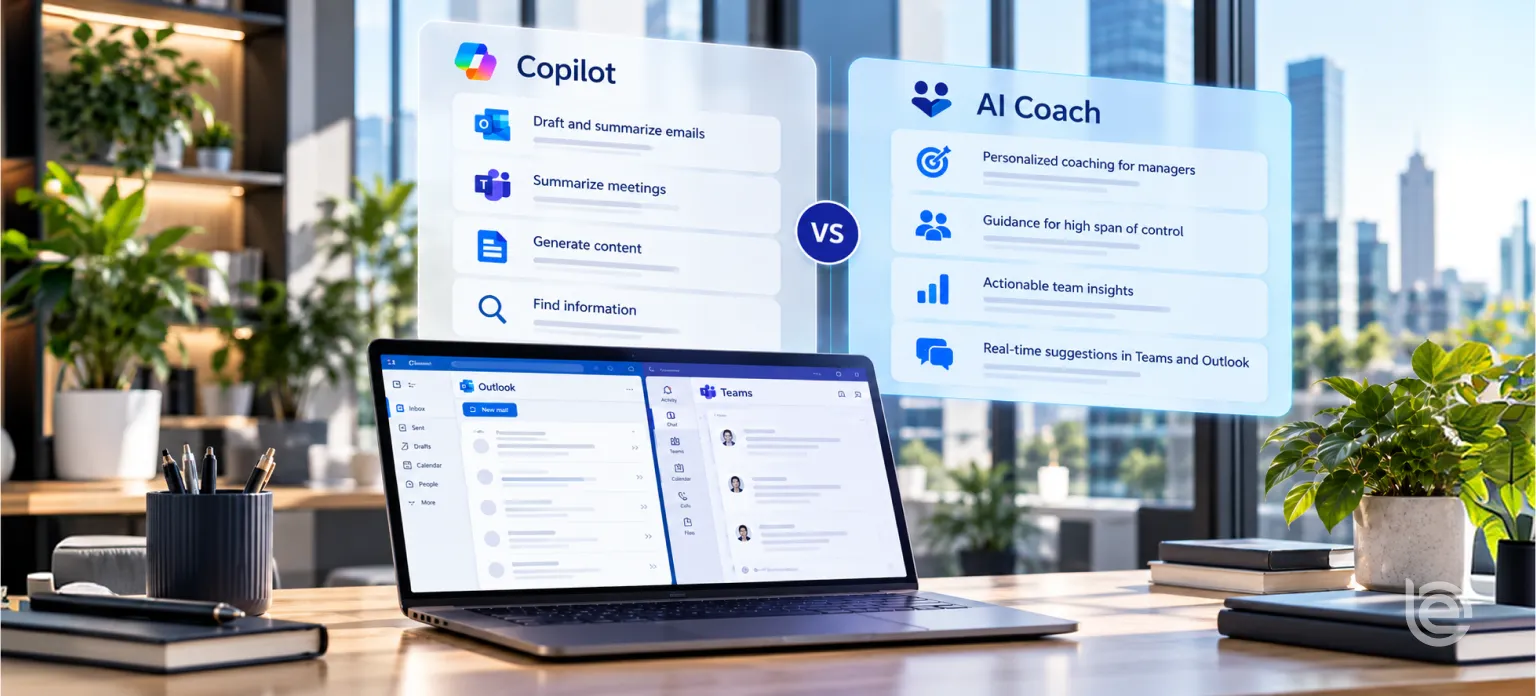
Microsoft 365 Copilot is designed to help people work with information across the Microsoft environment. AI Coach serves a different purpose: BullseyeEngagement positions it as real-time guidance for feedback, performance conversations, development discussions and team communication, grounded in Humantelligence’s psychometric science and available in tools such as Microsoft Teams and Outlook. The two products can therefore be complementary rather than substitutes.
Key takeaways
- Copilot is grounded in web and work data through Microsoft Graph, scoped to what each user can access. It’s excellent for content and productivity tasks.
- It doesn’t hold a validated behavioral profile of each colleague, so its people advice stays general unless you supply the context.
- AI Coach uses Humantelligence’s assessment of Behaviors, Motivators and Work Energizers to shape guidance for each individual.
- The 2 tools do different jobs. Use Copilot for the work and AI Coach for the people conversations around it.
The objection every buyer raises
If you’re evaluating AI coaching in 2026, someone in the room has already said it: “We pay for Copilot. It’s in Outlook and Teams. Why would we buy another AI tool for managers?”
It’s a fair question. Microsoft has put AI in front of millions of workers, and managers are already using it to summarize meetings and draft emails. Adding a second AI tool needs a clear reason.
The difference is the type of context each tool is designed around. Microsoft 365 Copilot is a broad productivity assistant grounded in the work data a user is permitted to access. AI Coach adds a psychometric lens – behaviors, motivators and work energizers – specifically to help managers adapt communication and coaching to the individual.
What Microsoft 365 Copilot does well
Start with what Copilot is. Microsoft’s Copilot overview says its experiences are powered by large language models, grounded in web and organizational data through Microsoft Graph and Work IQ, with access scoped by user permissions. Licensing matters. The basic Copilot Chat experience works with web data, while Microsoft 365 Copilot works with web and work data.
For managers, that grounding is valuable. Copilot can:
- Summarize long email threads and meetings
- Draft documents and messages from your files
- Find information across your organization’s content
- Help prepare for a meeting by pulling related emails and documents
Microsoft’s research shows leaders are leaning in. Its 2025 Work Trend Index found 67% of leaders are familiar with AI agents, compared with 40% of employees. Leaders also expect their teams to be training and managing agents within 5 years.
None of this is in dispute. Copilot is a strong productivity layer.
What Copilot doesn’t know about your people
Here’s the gap. Copilot sees what people write and share. It doesn’t hold a validated profile of how each person works.
Ask Microsoft 365 Copilot how to prepare for a difficult feedback conversation and it can provide useful general guidance and work from the information available to it. AI Coach is designed for a different layer of personalization: it uses a completed psychometric assessment to tailor communication and coaching guidance to the individual. Managers still decide what to say and how to act.
Emails are also a weak personality signal. People write differently to their manager than they behave in a tense 1:1. Inferring personality from message history is guesswork, and many employees would find it uncomfortable.
That’s the job a psychometric coach is built for.
What AI Coach does differently
AI Coach comes from BullseyeEngagement’s OEM partnership with Humantelligence, the company behind the Ask Aura AI coach. The partnership announcement describes psychometric science combined with generative AI that gives employees instant, context-aware guidance on leadership, communication and team dynamics in their flow of work.
The assessment underneath
According to Humantelligence’s platform page, its proprietary assessment measures Behaviors, Motivators and Work Energizers in about 10 minutes. Humantelligence calls this the BMW model and says it can be mapped to custom leadership or competency models. The company also describes the assessment as built on more than 30 years of research with 92% accuracy across key workplace traits, and reports that 60% of employees use its insights daily, compared with under 5% for traditional assessments. Those are vendor figures, but they point to the design goal: insight people actually use.
What managers get
BullseyeEngagement’s product page lists what AI Coach delivers:
- Conversation guidance for each individual, based on personality and motivation insight
- In-the-moment coaching for feedback, expectations and performance conversations
- Early friction detection with practical resolution paths
- Coaching support that helps new managers build confidence faster
- Bias-aware prompts for consistency and decision quality
- Development guidance for growth conversations
And it works where managers already are, including Microsoft Teams and Outlook.
The platform connection
AI Coach is part of BullseyeEngagement’s broader talent and performance ecosystem, alongside capabilities such as check-ins, goals, performance reviews and development plans. The current BullseyeEngagement website positions AI Coach primarily around psychometric-based, in-the-moment coaching; it should not be described as automatically reading every record from those modules unless that data flow is confirmed for the customer’s configuration.
AI Coach vs Microsoft 365 Copilot: side by side
Question | Microsoft 365 Copilot | AI Coach |
Primary job | Productivity across work content | People conversations and manager development |
What it’s grounded in | Web and organizational data through Microsoft Graph, scoped by permissions | Psychometric profiles based on Behaviors, Motivators and Work Energizers |
Knows each colleague’s work style? | Only what can be inferred from content you can access or supply | Yes, from a validated assessment each person completes |
Where it works | Across Microsoft 365 apps | Inside Teams and Outlook, connected to the Bullseye platform |
Best for | Summaries, drafts, search, meeting prep from documents | Feedback, conflict, recognition, goal-setting and development conversations |
Links to goals and development plans | Through documents you can access | Available within Bullseye solutions alongside check-ins, OKRs and development plans; direct data flow should be confirmed by configuration |
Bias-aware prompts for people decisions | General responsible AI controls | Bullseye positions AI Coach around consistent, personalized coaching guidance grounded in psychometric insight |
Data training | Microsoft enterprise data protections apply | Humantelligence states it doesn’t train on users’ AI data |
The table makes the point without exaggerating either side. These tools overlap only at the edges.
6 manager scenarios, 2 approaches
To make the difference concrete, here’s how each tool would typically approach common manager problems. These are descriptions of approach, not transcripts.
Scenario 1: giving critical feedback to a high performer
Copilot approach. Pull recent project documents and emails, summarize the performance issue and suggest a balanced feedback structure. Advice on tone is general unless the manager adds context.
AI Coach approach. Start from the employee’s profile. If they value autonomy and move fast, suggest being direct and inviting them to own the fix. If they value stability, suggest acknowledging recent work first and agreeing on a clear checkpoint.
Takeaway. Copilot helps with the facts. AI Coach helps with the delivery.
Scenario 2: resolving tension between 2 team members
Copilot approach. Summarize relevant threads and suggest a general conflict resolution framework.
AI Coach approach. Compare the 2 profiles to explain where friction is likely coming from, such as 1 person who wants fast decisions and 1 who wants careful review. Suggest a conversation that names the difference in work style, which lowers the heat.
Takeaway. Understanding why 2 people clash is what makes the fix stick.
Scenario 3: writing recognition that lands
Copilot approach. Draft a thank-you message based on the work completed.
AI Coach approach. Suggest how this person prefers recognition. Some want public credit in a team channel. Others would rather get a private note that names the specific skill they used.
Takeaway. The same words can motivate 1 person and embarrass another.
Scenario 4: setting goals for the next quarter
Copilot approach. Pull strategy documents and draft goals aligned to team priorities.
AI Coach approach. Help frame each person’s goals around what energizes them. The Humantelligence announcement describes AI suggesting goal language tied to each person’s motivators, which makes follow-through more likely. Pair it with Bullseye OKRs so the goals live where progress is tracked.
Takeaway. Aligned goals are necessary. Motivating goals get done.
Scenario 5: onboarding a new team member
Copilot approach. Gather onboarding documents and summarize team processes for the new hire.
AI Coach approach. Once the new hire completes the assessment, show the manager how they prefer to work and learn, and how they’re likely to fit with existing team members.
Takeaway. Copilot shares the handbook. AI Coach helps the manager build the relationship.
Scenario 6: preparing a tough email to an upset employee
Copilot approach. Draft a professional, empathetic reply using the email thread.
AI Coach approach. According to BullseyeEngagement’s AI Coach FAQ, it can suggest improvements to clarity and tone based on the recipient’s style. For someone who values directness, that might mean a shorter reply that gets to the point. For someone who values relationships, it might mean acknowledging the feeling first.
Takeaway. Both can draft. Only 1 knows the reader.
Why “both” is usually the right answer
Framing this as Copilot versus AI Coach is useful for comparison, but the tools solve different problems. Organizations already using Microsoft 365 Copilot may choose to add a people-focused coaching layer when the business problem is manager effectiveness, communication quality or development – rather than general productivity.
Here’s a simple split that works.
Manager task | Use |
Summarize the week’s email and meetings | Copilot |
Prepare facts for a performance conversation | Copilot |
Decide how to deliver that conversation to this person | AI Coach |
Draft a project update | Copilot |
Recognize a team member in a way they’ll value | AI Coach |
Find a policy document | Copilot |
Handle friction between 2 people | AI Coach |
Plan a development conversation | AI Coach with the person’s development plan in Bullseye |
Managers don’t need to think about which tool is “better.” They need to know which one fits the question in front of them.
What the adoption data says
AI adoption isn’t automatic, even when tools are available. Gartner found that 65% of employees are excited to use AI at work, yet 37% don’t use AI when they could because their co-workers aren’t using it. In another survey, Gartner reported that 45% of managers say AI has improved their teams’ work as much as they expected.
The lesson for a people-focused coach is that relevance drives use. Guidance that clearly fits a real person and a real situation gets used. Generic advice gets ignored, whichever tool it comes from.
The wider HR market shows the same pattern. Sapient Insights’ 2025 to 2026 HR Systems Survey found 31% of organizations use some kind of AI-enabled technology. Among them, ChatGPT is the most common at 58%, while HR applications with embedded AI sit at 9%. Most HR teams are still using general-purpose AI for specialized work. That’s the gap purpose-built tools are meant to close.
What managers actually ask an AI coach
It helps to picture real use. These are the kinds of questions managers bring to a people-focused coach in a normal week.
- “How should I tell Sam his promotion is delayed without losing him?”
- “Two of my engineers keep talking past each other in stand-ups. What’s going on?”
- “I need to give Leila feedback on her presentation. She took it badly last time.”
- “How do I get my new hire to speak up in team meetings?”
- “What’s the best way to set stretch goals for someone who hates ambiguity?”
- “I have to announce a reorganization. How will each person on my team react?”
Every one of these questions is about a specific person. Copilot can help with the logistics around them, such as finding the reorganization memo or summarizing last month’s stand-up notes. The advice on how to handle each person is where a profile-based coach does its best work.
Notice something else. Many of these questions are ones managers would hesitate to ask their own boss or HR partner. A private coach lowers the barrier to asking for help, which is exactly when help is most useful.
The hidden cost of generic people advice
Generic advice isn’t harmless. It can make a situation worse.
Take a common piece of management advice: deliver feedback using a “praise, critique, praise” structure. For some people, it works well. For others, especially those who value directness, it feels evasive, and they miss the critique entirely. A manager following the generic rule gets a worse result than a manager who adjusted to the person.
Or take recognition. Public praise is a standard recommendation. For an introverted team member who values privacy, a shout-out in front of 30 people can feel uncomfortable. The manager meant well and lost ground.
Multiply these small misses across a team of 12 and a year of conversations, and the cost shows up in engagement scores. Gallup has found that only 16% of employees described their last conversation with their manager as extremely meaningful. Specific, well-judged conversations are what move that number.
That’s the practical argument for a psychometric coach. It doesn’t make managers perfect. It makes their default approach fit the person more often.
Rolling out AI Coach in a Microsoft 365 organization
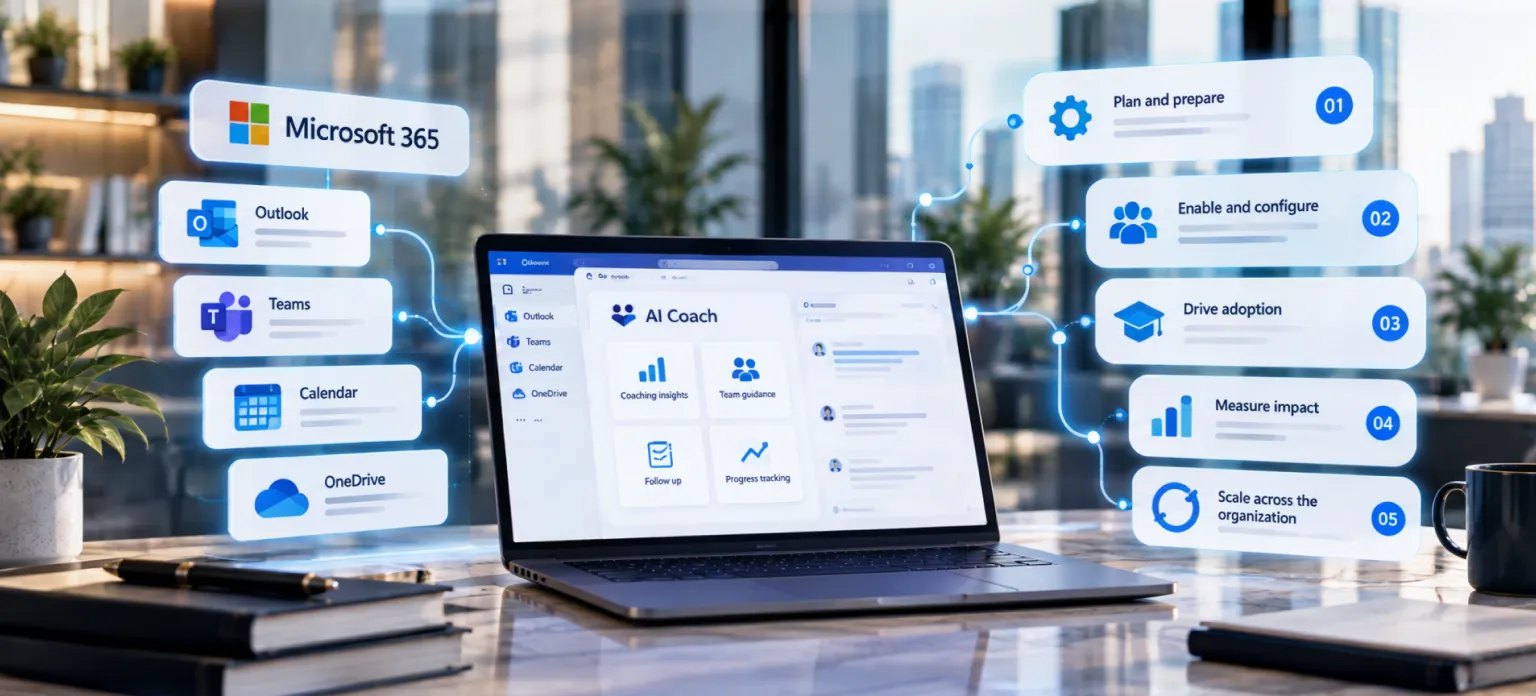
If your organization already runs on Microsoft 365, adoption can be smooth. A sensible sequence looks like this.
Start with IT and security. Share the vendor’s security documentation, confirm single sign-on and agree on how the Teams and Outlook experience will be enabled.
Pick a pilot group. Choose managers who lead larger teams or are new to management. They get the most value and become strong advocates.
Explain the assessment. Team members complete the behavioral assessment. Tell them what it measures, how long it takes, how the results are used and who can see them.
Show managers where it appears. A short walkthrough of AI Coach inside Teams and Outlook is more useful than a long training session.
Set a weekly habit. Ask pilot managers to use AI Coach before each 1:1 for a month. Habits form faster with a clear trigger.
Clarify the division of labor. Tell managers plainly: use Copilot for content, use AI Coach for people. A 1-page guide with examples helps.
Gather feedback after 30 days. Ask what helped, what didn’t and what was confusing. Adjust before expanding.
Expand by team, not by individual. Coaching works best when the whole team has completed the assessment, so the manager’s guidance covers everyone.
Privacy and trust: questions to settle before rollout
Adding any AI tool that touches people data raises fair questions. Settle them before launch.
What data does each tool use? Microsoft 365 Copilot uses information available through the Microsoft environment subject to permissions and product configuration. AI Coach’s documented personalization is grounded in the psychometric profile employees complete through Humantelligence. Confirm any additional Bullseye data connections for your specific configuration before rollout.
Is data used to train models? Microsoft applies its enterprise data protections to Copilot. Humantelligence states that Ask Aura never trains on users’ AI data, and its LLM partners don’t train on customer data.
How is data secured? Humantelligence lists AES-256 encryption at rest, TLS 1.2 or higher in transit and GDPR and CCPA compliance.
Does coaching follow professional standards? Humantelligence has published how Ask Aura aligns with the International Coaching Federation’s AI coaching standards.
Who sees what? Define this before rollout. Access, permissions and privacy expectations should be documented with the product and security teams, and employees should be told what profile information managers can use for coaching and what is not part of the coaching experience.
What are profiles used for? Be clear that behavioral profiles describe work preferences. They aren’t performance ratings, and they shouldn’t be used to judge people. Our post on AI coach vs AI judge covers this line in detail.
How to evaluate an AI coach if you already have Copilot
Use a short pilot to settle the question with evidence.
Pick 2 matched groups
Choose 2 groups of managers with similar team sizes and functions. Both keep Copilot, and 1 of them adds AI Coach.
Agree on the measures
Track meaningful feedback scores from a pulse survey, 1:1 completion, team engagement, escalations to HR and manager confidence. Keep the list short.
Give it a full quarter
Coaching habits take weeks to form. A 2-week trial will measure novelty, not value.
Collect stories as well as numbers
Ask pilot managers for specific moments where the coaching changed how a conversation went. Those stories help other managers adopt the tool.
Decide on evidence
If the AI Coach group shows better feedback and engagement scores, you have your answer. If not, you’ve learned something useful for a small cost.
Where AI Coach fits in the Bullseye platform
AI Coach is offered within BullseyeEngagement’s talent and performance solutions, including the Talent Development & Coaching and Performance Management & Coaching experiences. BullseyeEngagement also positions the platform for deployment in approximately 4 to 8 weeks depending on scope and configuration. Confirm commercial packaging and pricing with BullseyeEngagement rather than assuming a separate or bundled price from a blog post.
AI Coach and AI Advisor also serve different layers of talent management. AI Coach supports managers in day-to-day conversations using psychometric insight. AI Advisor analyzes signals across Bullseye modules and, for succession, ranks internal talent using role alignment, competencies, performance and potential, assesses readiness and bench strength, builds development plans and flags exposure. The current product page does not require describing private AI Coach conversations or psychometric profiles as direct AI Advisor ranking inputs.
For the wider context on why coaching became central to HCM, read the first HCM platform with AI coaching.
Common questions from IT and security teams
Your IT team will want answers before approving another AI tool in the Microsoft environment. Prepare these.
Does it need Microsoft approval? Humantelligence states that Ask Aura is approved by Microsoft, Google, Slack, WebEx and Zoom, with automated enterprise deployment in less than a week.
Does it change our Copilot setup? Treat AI Coach as a separate coaching capability that can be used alongside Microsoft 365. Confirm enablement, permissions and any Teams or Outlook deployment requirements with your IT team and the vendor before rollout.
What does it integrate with? BullseyeEngagement lists technology partners including Microsoft, AWS, Okta and BambooHR on its technology partners page.
How is identity handled? Ask the vendor to walk through single sign-on and provisioning for your environment during evaluation.
A manager’s week with both tools
Here’s how the 2 tools fit together for a typical manager with a large team. The manager is illustrative, but the pattern reflects how many Microsoft 365 organizations work.
Monday morning. Copilot summarizes the weekend’s email threads and flags 3 messages that need a reply today. The manager uses AI Coach to prepare for the week’s 1:1s, checking how each person prefers to receive feedback.
Tuesday. A team member pushes back hard in a project meeting. Copilot produces the meeting recap and action items. Before following up, the manager asks AI Coach how to approach that person, given their profile, so the conversation doesn’t escalate.
Wednesday. The manager drafts a recognition note for a colleague who carried a release over the line. Copilot helps tighten the wording. AI Coach suggests keeping it private, since this person tends to find public praise uncomfortable.
Thursday. Two team members have been sending short, tense messages to each other. The manager uses AI Coach to prepare for a conversation about the friction, using work-style insight to think through tone and approach. Copilot can help gather the relevant work context so the manager has the facts straight.
Friday. The manager sets goals for next quarter. Copilot pulls last quarter’s results into a summary. AI Coach suggests goal wording that fits what motivates each person.
Across the week, Copilot handled information. AI Coach handled people. Neither replaced the other.
Signs your managers need more than a general assistant
Copilot adoption can be high while people outcomes stay flat. Watch for these signals.
Engagement differs sharply between teams with similar work. That usually points to manager behavior, which a general assistant doesn’t change.
New managers still struggle with tough conversations. If first-time managers keep escalating issues to HR, they need guidance about people, beyond help with documents.
Feedback scores lag. If employees say they rarely get meaningful feedback, managers need help making feedback specific to each person.
Conflict reaches HR late. Friction that runs for weeks before anyone acts is a sign managers aren’t seeing it early.
Managers ask general AI tools for people advice. It’s a good instinct with a weak source. The advice they get is generic because the tool doesn’t know the people involved.
If you see 2 or more of these, a psychometric AI coach is worth piloting alongside Copilot.
A quick decision guide
Use this short test when someone asks whether your organization needs an AI coach on top of Copilot.
If your main problem is information overload, such as long threads, meeting notes and document drafting, Copilot is the right first investment.
If your main problem is uneven people leadership, such as inconsistent feedback, avoidable conflict and new managers who struggle, a psychometric AI coach addresses it more directly.
If you have both problems, which most growing organizations do, use both and give each a clear job. Tell managers plainly: use Copilot for your work, and use AI Coach for your people.
Frequently asked questions
What is the difference between AI Coach and Microsoft Copilot?
Microsoft 365 Copilot is a broad productivity assistant that can work with web and organizational data according to the user’s permissions and license. AI Coach is a people-focused coaching capability grounded in Humantelligence’s psychometric science. BullseyeEngagement positions AI Coach around real-time guidance for feedback, performance conversations, development discussions and team communication. They can be complementary because they are designed around different kinds of work.
Can Microsoft Copilot coach managers?
Copilot can give general management advice and help prepare the facts for a conversation, especially using emails and documents the manager can access. What it doesn’t have is a validated behavioral profile of each colleague, so its advice on how to approach a specific person stays general unless the manager supplies that context. A psychometric coach like AI Coach is designed to fill that gap.
Do I need AI Coach if I already have Copilot?
Many organizations may benefit from both because the tools address different needs. Copilot is designed for broad productivity across work content. AI Coach is designed to help managers prepare for people conversations using psychometric insight. The right choice depends on the problem you are trying to solve, so a focused pilot is more useful than assuming one tool replaces the other.
What is a psychometric AI coach?
A psychometric AI coach combines structured behavioral insight with AI-generated guidance for workplace conversations. AI Coach uses Humantelligence’s assessment of Behaviors, Motivators and Work Energizers to personalize guidance for communication, feedback, development and team interaction. The manager remains responsible for the conversation and decision.
Does AI Coach work in Microsoft Teams and Outlook?
Yes. BullseyeEngagement positions AI Coach as available in the tools teams already use, including Microsoft Teams and Outlook. The value is in bringing psychometric-based coaching guidance into the manager’s flow of work. Bullseye’s broader platform also includes check-ins, goals and development capabilities, but the current website should not be read as saying that every one of those records automatically feeds AI Coach.
Is my team’s data used to train AI models?
Humantelligence, the company behind the technology in AI Coach, states that Ask Aura never trains on users’ AI data and that its LLM partners don’t train their models on customer data. It also lists AES-256 encryption at rest and TLS 1.2 or higher in transit. For Copilot, Microsoft applies its enterprise data protections. Review both vendors’ documentation with your security team.
What does Humantelligence’s behavioral assessment measure?
Humantelligence describes its assessment as measuring 3 areas: how a person tends to behave at work, what motivates them and what gives them energy in their work. It takes about 10 minutes and can be mapped to leadership or competency models. The results describe work preferences. They aren’t performance ratings and shouldn’t be used to judge people.
Can AI Coach and Copilot conflict with each other?
They are designed for different jobs, so conflict is not the main question. Microsoft 365 Copilot can help with work content and general preparation; AI Coach adds psychometric-based guidance about how to approach a specific person. If recommendations differ, the manager should use judgment, context and organizational policy rather than treating either tool as the decision-maker.
How much does AI Coach cost?
BullseyeEngagement does not publish a universal list price for AI Coach on its website. AI Coach appears within Bullseye’s Talent Development & Coaching and Performance Management & Coaching offerings, but scope and pricing can vary by customer. Request a current quote based on headcount, modules and deployment requirements.
How should we pilot an AI coach alongside Copilot?
Run a focused pilot with a defined manager population and clear measures such as check-in quality, manager confidence, engagement signals and adoption. Keep Microsoft 365 Copilot in place, add AI Coach for the pilot group, and compare whether managers report better preparation and more consistent people conversations. Use the results – not assumptions about the tools – to decide whether to scale.
Give managers AI that knows their people
Copilot made managers faster with their work. The next step is helping them get better with their people, and that needs a different kind of AI.
See AI Coach in action inside Teams and Outlook. Book a demo with BullseyeEngagement and bring 2 or 3 real manager scenarios. We’ll show you how the guidance changes from person to person.